
Ingestion Observability (Beta)
Ingestion Observability (beta) allows you to easily track and understand the status of your assets as they go through the ingestion pipeline. You’ll gain insights into asset statuses, error occurrences, and ingestion completion directly through the Coactive UI or via API.
How to Access Ingestion Observability
Section titled “How to Access Ingestion Observability”- Log into the Coactive UI.
- Select your desired dataset.
- Click on the “View ingestions” button at the top right corner underneath the search bar.
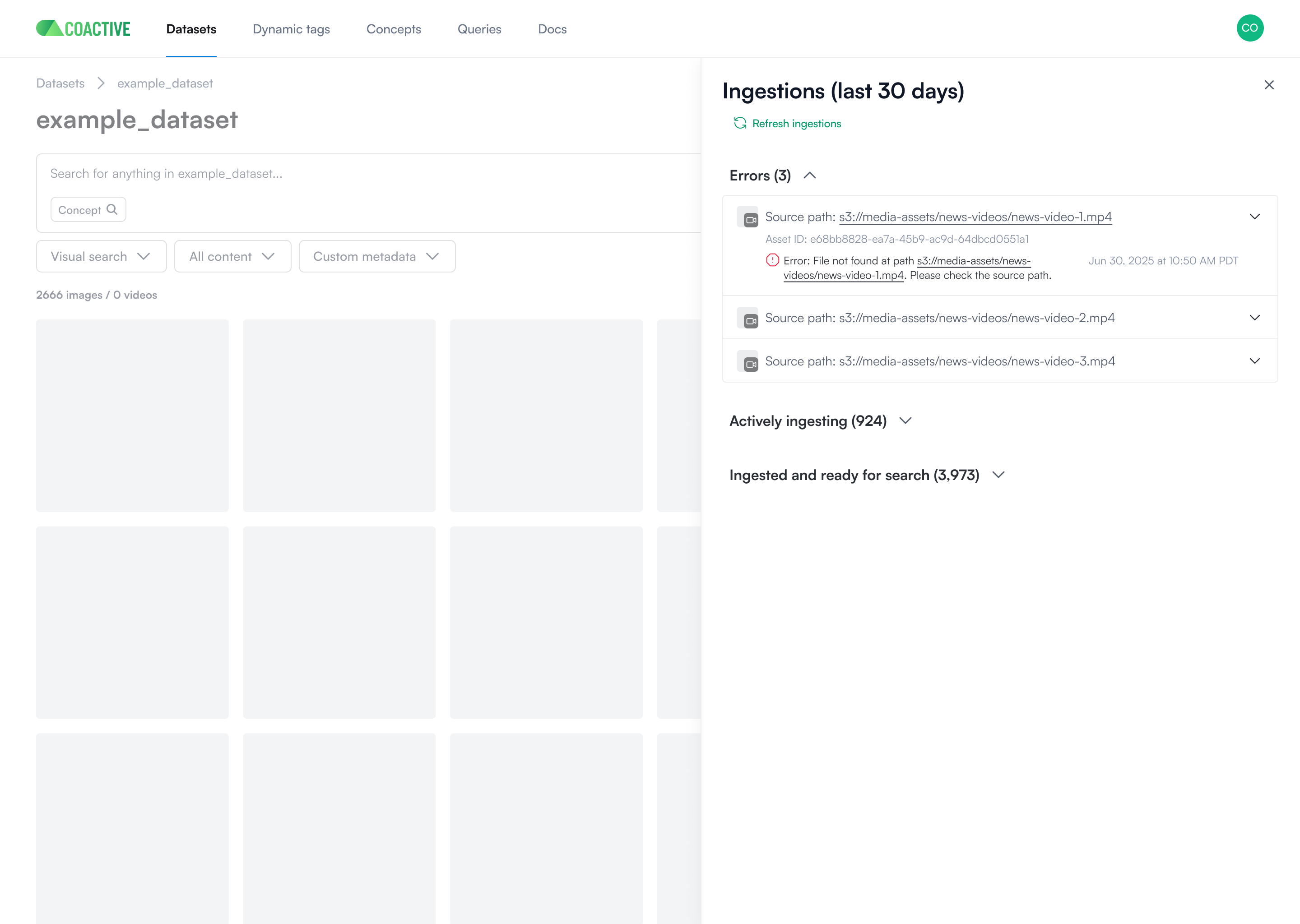
- A new tab opens, displaying ingestion statuses categorized as:
- Errors: Assets that failed ingestion.
- Actively Ingesting: Assets currently being processed.
- Ingested and Ready to Search: Assets that are complete and visible in the dashboard.
👉 After pressing Refresh ingestions, you’ll see updated statuses. Once assets show as Ingested and Ready to Search, refresh the dataset page to view them in the dashboard.
🧠 As soon as an asset enters the ingestion pipeline, it receives an asset ID and source_path which can be referenced for debugging or tracing.
Asset Status Categories Explained
Section titled “Asset Status Categories Explained”- Errors: These assets failed during ingestion. See the error code section below for details and resolution steps.
- Actively Ingesting: These assets are currently progressing through one or more stages:
- Ingestion request received
- Processing started
- Metadata storage completed
- Ingested and Ready to Search: Assets that have been fully processed, indexed, and are now visible and searchable in the dashboard with thumbnail previews.
Common Ingestion Error Codes & Troubleshooting
Section titled “Common Ingestion Error Codes & Troubleshooting”When an asset fails ingestion, Coactive automatically retries. If it still fails after retries, it moves to the Errors section and requires manual review.
| Error Code | What It Means | How to Resolve |
|---|---|---|
| unknown | The cause of the failure is unclear or not categorized. | Ensure the file meets Coactive’s Accepted Media Formats. If unresolved, contact support. |
| unknown_content_type | The system could not determine the file type (image, video). | Check that the file is a valid, non-empty image or video stored at an accessible URL or S3 path. Ensure the media content is well-formed and uses supported formats/codecs. |
| permission_denied | The file could not be accessed by Coactive due to insufficient permissions. | Ensure the IAM role or public/pre-signed URL allows Coactive access to the file. |
| unsupported_uri_scheme | The file path uses a protocol Coactive doesn’t support (e.g. ftp://). |
Use supported schemes: https://, http://, or s3://. |
| asset_metadata_error | There was an issue storing the asset’s metadata. | Validate your metadata for required fields, correct data types, and proper formatting. |
| unsupported_source_type | The asset was submitted with a source type not supported by the platform. | Use only supported image/video types listed in the accepted formats documentation. |
| audio_processing_failed | The asset’s audio failed during extraction. | Check that the video length is at least 5 seconds, in a supported codec, and in a language supported by the platform. |
Additional Tips
Section titled “Additional Tips”- You can track asset ingestion programmatically by storing the
ingest_job_idreturned in your ingestion API call and querying the ingestion status via API. - Multiple errors will not currently appear simultaneously, but this is being considered for future support.
- If your asset uses special characters in metadata or headers (e.g., in CSVs), validate that formatting adheres to ingestion schema located in our accepted media formats guide.
- Ingestion status will be stored on a rolling 30 days basis.
Need More Help?
Section titled “Need More Help?”If you encounter persistent issues or have questions, don’t hesitate to contact Coactive Support. We’re here to help with any aspect of your ingestion workflow.
As this feature is currently in beta, your feedback is especially valuable. If there are additional error codes, capabilities, or improvements you’d like to see, we’d love to hear from you.