
Analyzing Dynamic Tags with SQL
Understanding the distribution of dynamic tags in a dataset is crucial for metadata generation, content categorization, and trend analysis. This tutorial will guide you through SQL queries that help you:
- Analyze the distribution of dynamic tags to determine the most frequent categories.
- Retrieve the top tags for each image to identify key labels in your dataset.
- Retrieve the top tags for each video to generate meaningful metadata at the video level.
By the end of this tutorial, you’ll be able to extract structured insights from dynamic tag metadata using SQL.
Analyze the Distribution of Dynamic Tags in a Dataset
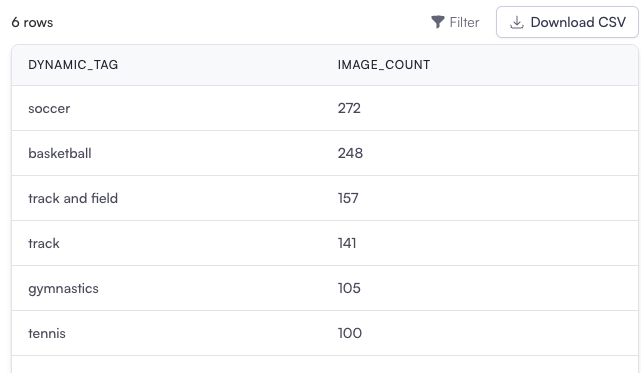
Section titled “Analyze the Distribution of Dynamic Tags in a Dataset”This query calculates how often each dynamic tag appears across the dataset, helping you understand category distribution.
-- Step 1: Rank dynamic tags for each image based on their scoresWITH ranked AS (    SELECT        coactive_image_id,        -- The unique ID for each image        tag_name,                 -- The tag assigned to the image        score,                    -- The confidence score for the tag        ROW_NUMBER() OVER (            PARTITION BY coactive_image_id  -- Separate ranking for each image            ORDER BY score DESC             -- Rank tags by confidence score in descending order        ) AS rn                   -- Assign a rank to each tag per image    FROM        dt_sports_visual          -- V3 Dynamic Tags visual table),
-- Step 2: Filter to keep the most relevant tags for each imageimage_tag_table AS (    SELECT        coactive_image_id,        -- Image ID        tag_name,                 -- Tag name        score                     -- Confidence score for the tag    FROM        ranked    WHERE        rn <= 3                   -- Keep only the top 3 tags per image        AND score > 0.01          -- Exclude low-confidence tags (score <= 0.01))
-- Step 3: Aggregate tag distribution across the datasetSELECT    tag_name,                     -- Tag name    COUNT(DISTINCT coactive_image_id) AS image_count  -- Count the number of unique images with this tagFROM    image_tag_tableGROUP BY    tag_name                      -- Group results by tag nameORDER BY    image_count DESC;            -- Order by the frequency of each tag in descending order
Explanation
Section titled “Explanation”-
CTE (ranked): Assigns a rank to each dynamic tag within every image based on the tag’s score.
-
CTE (image_tag_table): Filters the ranked results to include:
- The top 3 tags per image (
rn <= 3). - Tags with scores above a configurable threshold (dynamic_tag_score > 0.01)
- The top 3 tags per image (
-
Final Query: Counts how many unique images contain each dynamic tag.
Use Cases
Section titled “Use Cases”- Identify most common categories in a dataset.
- Prioritize frequently occurring tags for search and recommendation systems.
Retrieve the Top Tags for Each Image
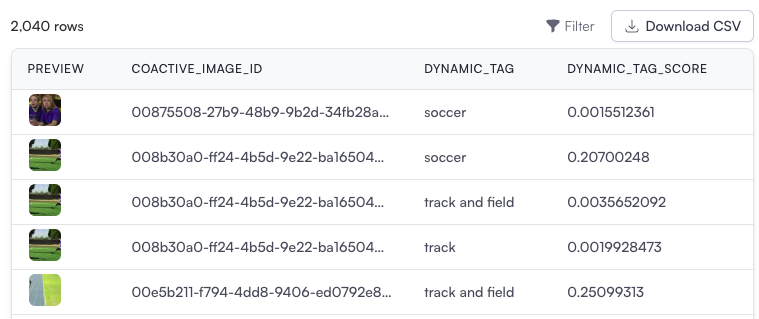
Section titled “Retrieve the Top Tags for Each Image”This query retrieves the most significant dynamic tags for each image, helping with content categorization.
-- Step 1: Join with core table to get video association informationWITH video_info AS (    SELECT DISTINCT        dt.coactive_image_id,        t.coactive_video_id    FROM dt_sports_visual dt    JOIN coactive_table t ON dt.coactive_image_id = t.coactive_image_id    WHERE t.coactive_video_id IS NOT NULL -- Filter for video keyframes),
-- Step 2: Rank tags for each image, excluding video keyframes for standalone image analysisranked AS (    SELECT        dt.coactive_image_id,        dt.tag_name,        dt.score,        ROW_NUMBER() OVER (            PARTITION BY dt.coactive_image_id -- Rank tags for each image            ORDER BY dt.score DESC -- Highest scoring tags first        ) AS rn    FROM dt_sports_visual dt    WHERE dt.coactive_image_id NOT IN (SELECT coactive_image_id FROM video_info) -- Exclude video keyframes),
-- Step 3: Filter to retain the top 5 tags per imageimage_tag_table AS (    SELECT        coactive_image_id,        tag_name,        score    FROM ranked    WHERE rn <= 5 -- Keep only the top 5 tags per image          AND score > 0.001 -- Exclude low-confidence tags)
-- Final Output: Retrieve the most significant tags for each imageSELECT    coactive_image_id,    tag_name,    scoreFROM image_tag_table;
Explanation
Section titled “Explanation”-
CTE (video_only): Ensures the analysis focuses on standalone images by excluding video-related data in the next step, which is not necessary if your dataset only contains images.
-
CTE (ranked): Assigns a rank to each dynamic tag for every image (coactive_image_id), based on the tag’s score.
-
Final Query: Filters results to include only:
- The top 5 tags for each image (
rn <= 5). - Tags with a score above 0.001 to exclude irrelevant or low-confidence tags.
- The top 5 tags for each image (
Use Cases
Section titled “Use Cases”- Enable image-based metadata tagging for search and filtering.
- Improve content organization by identifying dominant tags in images.
Retrieve the Top Tags for Each Video
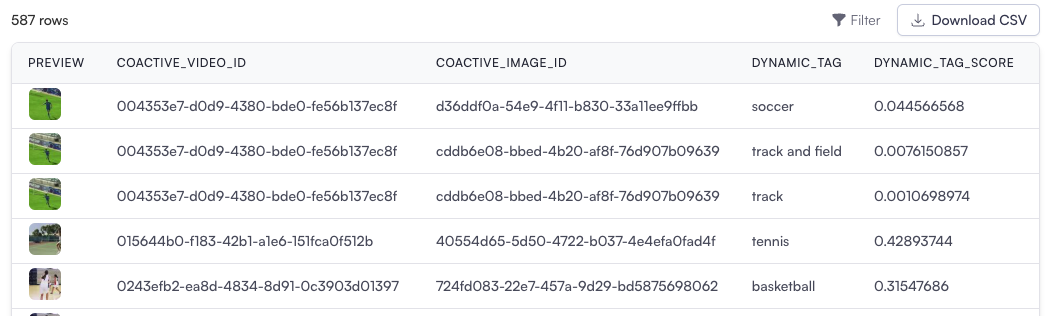
Section titled “Retrieve the Top Tags for Each Video”This query retrieves the most significant dynamic tags for each video, helping structure video metadata.
-- Step 1: Get video associations from keyframe dataWITH video_keyframes AS (    SELECT *        dt.coactive_image_id,        dt.tag_name,        dt.score,        t.coactive_video_id    FROM dt_sports_visual dt    JOIN coactive_table t ON dt.coactive_image_id = t.coactive_image_id    WHERE t.coactive_video_id IS NOT NULL -- Ensure valid video data),
-- Step 2: Rank tags for each keyframe within each videoranked AS (    SELECT        coactive_video_id,        coactive_image_id,        tag_name,        score,        ROW_NUMBER() OVER (            PARTITION BY coactive_video_id, coactive_image_id -- Rank tags separately for each keyframe within a video            ORDER BY score DESC -- Highest scoring tags first        ) AS rn    FROM video_keyframes),
-- Step 3: Remove duplicates for tags within each videodistinct_tags AS (    SELECT        coactive_video_id,        coactive_image_id,        tag_name,        score,        ROW_NUMBER() OVER (            PARTITION BY coactive_video_id, tag_name -- Rank each tag within the same video            ORDER BY score DESC -- Keep the highest score for each tag        ) AS tag_rank    FROM ranked    WHERE rn <= 5 -- Keep only the top 5 tags per keyframe          AND score > 0.001 -- Exclude low-confidence tags),
-- Step 4: Rank tags across the video to find the most significant onesvideo_tag_table AS (    SELECT        coactive_video_id,        coactive_image_id,        tag_name,        score,        DENSE_RANK() OVER (            PARTITION BY coactive_video_id -- Rank tags globally for the video            ORDER BY score DESC        ) AS rn_video    FROM distinct_tags    WHERE tag_rank = 1 -- Include only the best instance of each tag),
-- Step 5: Select the top 5 tags for each videovideo_top_tag_table AS (    SELECT *    FROM video_tag_table    WHERE rn_video <= 5 -- Limit to the top 5 tags per video    ORDER BY coactive_video_id, score DESC)
-- Final Output: Retrieve the most significant tags for each videoSELECT *FROM video_top_tag_table;
Explanation
Section titled “Explanation”-
CTE (video_only): Filters to keep only valid video data.
-
CTE (ranked): Ranks tags within each video by confidence score.
-
CTE (distinct_tags): Ensures that each tag appears only once per video, keeping the highest confidence score.
-
CTE (video_tag_table): Retrieves the top 5 tags per video.
Use Cases
Section titled “Use Cases”- Enhance video metadata for search and categorization.
- Provide a structured summary of video content for analysis.