
Analyzing Concepts with SQL
Understanding concept occurrences in images and videos is essential for metadata generation, content categorization, and trend analysis. This tutorial will guide you through SQL queries that help you:
- Retrieve concept occurrences over time to track when a concept appears in videos.
- Identify images labeled with a specific concept and evaluate confidence scores.
- Identify videos labeled with a specific concept and count labeled frames to measure concept frequency.
By the end of this tutorial, you’ll be able to extract structured insights from concept-based metadata using SQL.
Retrieve Concept Occurrences Over Time
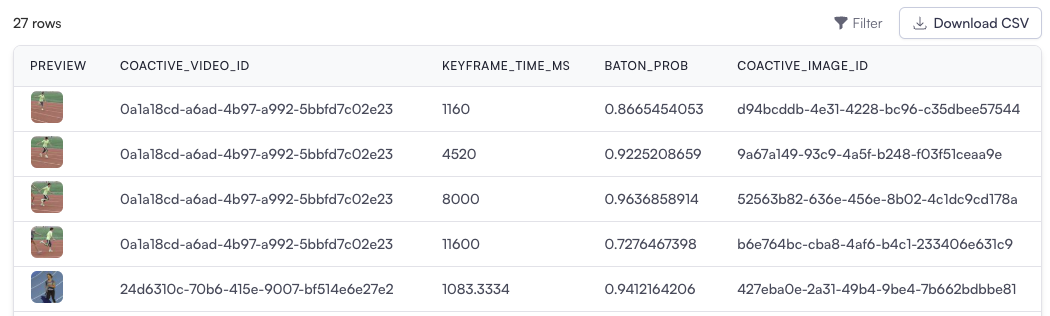
Section titled “Retrieve Concept Occurrences Over Time”This query helps pinpoint the exact times when a concept appears in a video. For example, tracking the presence of the “baton” concept in sports footage.
-- Step 1: Identify occurrences of the specific concept in video keyframesWITH occurrences AS (  SELECT    coactive_video_id,              -- Video ID    keyframe_time_ms,               -- Timestamp in milliseconds    baton_prob,                     -- Probability score for the baton concept    MAX(coactive_image_id) AS coactive_image_id  -- Select the best image for representation  FROM    coactive_table_adv  WHERE    baton_prob > 0.5  -- Only include keyframes with a confidence score above 0.5  GROUP BY    coactive_video_id, keyframe_time_ms, baton_prob)
-- Step 2: Retrieve and order results for concept occurrencesSELECT  o.coactive_video_id,              -- Video ID  o.keyframe_time_ms,               -- Time of occurrence  o.baton_prob,                     -- Concept probability  o.coactive_image_id               -- Best image for this occurrenceFROM  occurrences oORDER BY  o.coactive_video_id, o.keyframe_time_ms ASC;
Explanation
Section titled “Explanation”- CTE (occurrences): Filters frames where the “baton” concept appears with a probability above 0.5. Group data to ensure each timestamp has a representative image.
- Final Query: Retrieves and orders occurrences by video ID and timestamp, creating a timeline of when the concept appears.
Use Cases
Section titled “Use Cases”- Track specific moments when an object or action appears in a video.
- Provides a chronological view of occurrences within each video.
- Applications: Supports video editing, metadata creation, and storytelling based on specific concepts.
Identify Images Labeled with a Specific Concept
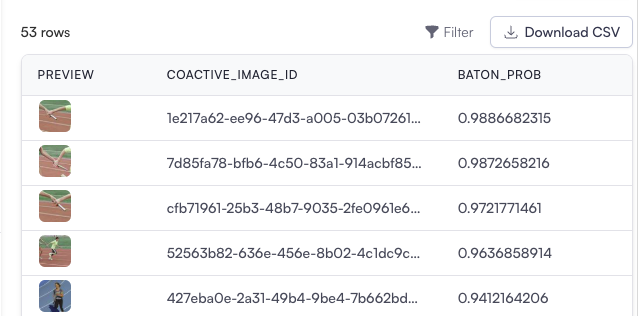
Section titled “Identify Images Labeled with a Specific Concept”This query retrieves images that can be labeled with a specific concept, along with their confidence scores.
-- Step 1: Filter images with the specified concept and sufficient confidenceWITH filtered_images AS (  SELECT    coactive_image_id,      -- Unique identifier for the image    baton_prob AS baton_prob -- Confidence score for the concept  FROM    coactive_table_adv  WHERE    baton_prob > 0.1 -- Include only images with a probability above 0.1)
-- Step 2: Retrieve the filtered images with their concept and certaintySELECT  coactive_image_id, -- Image ID  baton_prob          -- Confidence score for the detected conceptFROM  filtered_imagesORDER BY  baton_prob DESC; -- Order by confidence score in descending order
Explanation
Section titled “Explanation”- CTE (filtered_images): Filters images that have the specified concept (baton) and a confidence score (baton_prob) above a configurable threshold (e.g., 0.1).
- Final Query: Retrieves relevant images and sorts them by confidence score.
Use Cases
Section titled “Use Cases”- Identify high-confidence labels for images.
- Improve metadata tagging and searchability for datasets.
Identify Videos Labeled with a Specific Concept and Count Labeled Frames
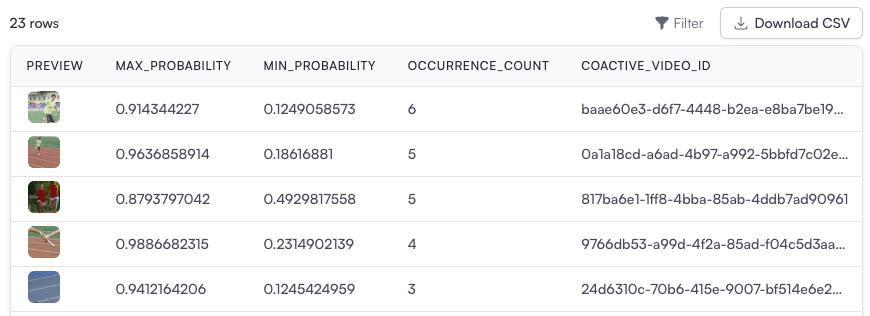
Section titled “Identify Videos Labeled with a Specific Concept and Count Labeled Frames”This query identifies which videos contain a specific concept and how many frames within each video are labeled with that concept.
-- Step 1: Aggregate occurrences of the concept across videosWITH occurrences AS (  SELECT    coactive_video_id,    COUNT(*) AS occurrence_count,  -- Count the number of frames with the concept    MAX(coactive_image_id) AS coactive_image_id, -- Select a representative image for the video    MAX(baton_prob) AS max_probability, -- Highest probability for the concept in the video    MIN(baton_prob) AS min_probability -- Lowest probability for the concept in the video  FROM    coactive_table_adv  WHERE    baton_prob > 0.1 -- Only include frames with a probability above this threshold  GROUP BY    coactive_video_id -- Group by video to analyze concept occurrences within each)
-- Step 2: Select relevant metadata for each videoSELECT  o.max_probability,   -- Maximum probability for the concept  o.min_probability,   -- Minimum probability for the concept  o.occurrence_count,  -- Number of frames with the concept  o.coactive_video_id, -- Video ID  o.coactive_image_id  -- Best representative image ID for the videoFROM  occurrences oORDER BY  o.occurrence_count DESC; -- Order by the number of frames with the concept
Explanation
Section titled “Explanation”- CTE (occurrences): Aggregates concept occurrences within each video, focusing on frames where the probability of the “baton” concept exceeds 0.1 and records the highest and lowest confidence scores.
- Final Query: Orders results by occurrence count to identify videos where the concept appears most frequently.
Use Cases
Section titled “Use Cases”- Automate concept-based video labeling.
- Understand concept density in long-form content.
- Improve content moderation and compliance monitoring. Knowing how many frames in a video exhibit the concept helps evaluate its significance within the video.